---
title: "Step 7: Communicating with Your Members"
description: Centralise volunteer communication with email or SMS campaigns. Target messages, track performance, and keep your community informed at every stage.
---
[Skip to content](https://support.weezevent.com/en/communicating-with-your-members#main-content)
- [English](https://support.weezevent.com/en/communicating-with-your-members)
- [Français](https://support.weezevent.com/fr/communiquer-avec-ses-membres)
English
Show submenu for translations
![weez-logo-D-nb02-1.svg\]](https://support.weezevent.com/hubfs/weez-logo-D-nb02-1.svg)
Open main navigation
Close main navigation
- - [English](https://support.weezevent.com/en/communicating-with-your-members)
- [Français](https://support.weezevent.com/fr/communiquer-avec-ses-membres)
English
Show submenu for translations
- [Log in to WeezCrew](https://admin.weezevent.com/crew/auth/sign-in/email)
[Log in to WeezCrew](https://admin.weezevent.com/crew/auth/sign-in/email)
Welcome to the WeezCrew helpcenter
- There are no suggestions because the search field is empty.
1. [WeezCrew - Help Centre](https://support.weezevent.com/en?hsLang=en)
2. [My first step with WeeCrew](https://support.weezevent.com/en/my-first-step-with-weecrew?hsLang=en)
3. [Les étapes clés](https://support.weezevent.com/en/my-first-step-with-weecrew?hsLang=en#les-%C3%A9tapes-cl%C3%A9s)
# Step 7: Communicating with Your Members
> The ***Campaigns*** module centralises your communications and streamlines the distribution of key information throughout your event. Whether your messages are general or targeted, campaigns can be sent via email or SMS to ensure each message reaches its intended recipient at the right time.
### **Sending E-mails and SMS to Members**
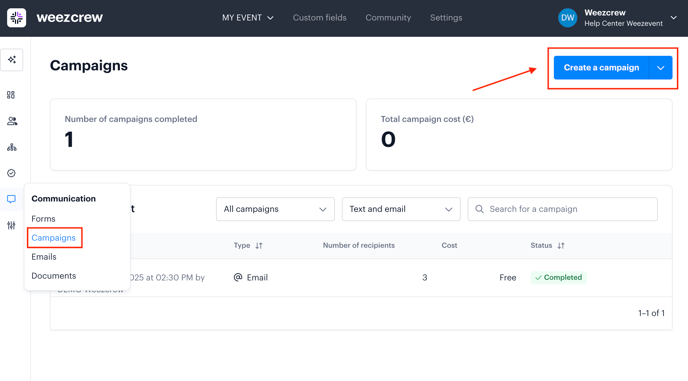
From your event dashboard, navigate to the ***Communication*** tab and open the ***Campaigns*** module.
To create a new campaign:
- Click on ***Create a campaign***
- Give it a name and select the type of campaign you wish to send (**E-mail** or **SMS**).
Note: The campaign name is an internal name that will not be visible to the recipients of your campaign.
**E-mail Campaign Content**
Enter the subject of your campaign, and create the email content using the text editor, where you can include dynamic fields (such as first name, surname, or even documents).
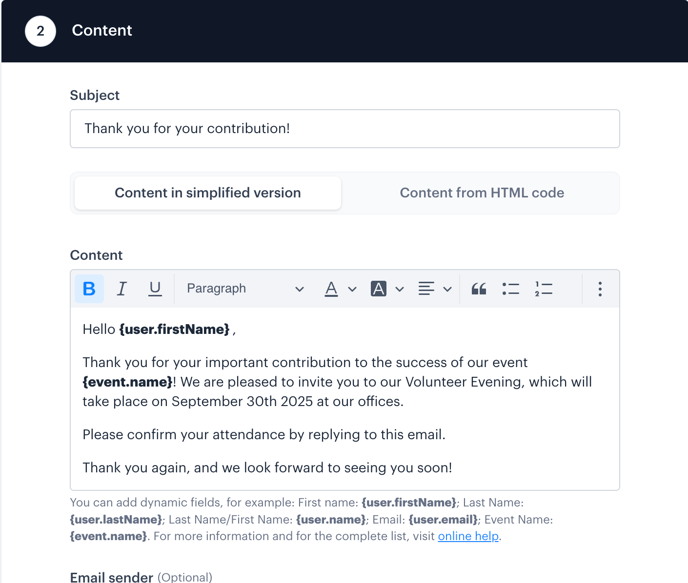
You may also include:
- Images
- Videos
- Links
- Attachments (Ensure the total email size does not exceed 10 MB)
**E-mail Sender**
Select the email signature you wish to use to communicate with your members.
**Recipients**
You can target specific groups depending on your requirements. Campaigns can be sent to:
- All assigned members
- Some members according to their status
- Some shift categories, shifts and/or tags
- Certain categories of accreditation and/or certain accreditations
- Some members (individually selected members)
- Some custom views
**Delivery (scheduling the campaign)**
Choose whether to send the campaign immediately or schedule it for a later date and time.
**Summary**
Before sending, you will be shown a summary that includes the number of recipients and, if applicable, the cost of the campaign.
**Note**: SMS campaigns are charged at **€0.07 per message**. Volunteers can reply free of charge, and their responses will be received within the platform.
E-mails will be sent from your own address, and responses will arrive in your inbox.
### **Tracking and Statistics**
Once your message has been sent, you can access a detailed report on the campaign’s performance. By clicking on the campaign, you can view:
- Open rate
- Click-through rate
- Number of messages sent
- List of volunteers who did not receive or open the message
These insights will help you monitor engagement and carry out targeted follow-ups if needed.
**Tip**: You can view past campaigns at any time by selecting them and clicking on the ***Preview*** section.
- [Account management](https://support.weezevent.com/en/account-management?hsLang=en#main-content)
- [Administrator](https://support.weezevent.com/en/account-management?hsLang=en#administrator)
- [Managers](https://support.weezevent.com/en/account-management?hsLang=en#managers)
- [My first step with WeeCrew](https://support.weezevent.com/en/my-first-step-with-weecrew?hsLang=en#main-content)
- [Les étapes clés](https://support.weezevent.com/en/my-first-step-with-weecrew?hsLang=en#les-%C3%A9tapes-cl%C3%A9s)
- [Members](https://support.weezevent.com/en/members?hsLang=en#main-content)
- [Member profile](https://support.weezevent.com/en/members?hsLang=en#member-profile)
- [Filter & Export member information](https://support.weezevent.com/en/members?hsLang=en#filter-export-member-information)
- [Member space](https://support.weezevent.com/en/members?hsLang=en#member-space)
- [Communauty](https://support.weezevent.com/en/members?hsLang=en#communauty)
- [Member attendance](https://support.weezevent.com/en/members?hsLang=en#member-attendance)
- [Teams](https://support.weezevent.com/en/teams?hsLang=en)
- [Custom fields](https://support.weezevent.com/en/custom-fields?hsLang=en)
- [Shifts](https://support.weezevent.com/en/shifts?hsLang=en#main-content)
- [Assignment Settings](https://support.weezevent.com/en/shifts?hsLang=en#assignment-settings)
- [Assignment Management](https://support.weezevent.com/en/shifts?hsLang=en#assignment-management)
- [Assignments](https://support.weezevent.com/en/assignments?hsLang=en)
- [Accreditations](https://support.weezevent.com/en/accreditations?hsLang=en)
- [Forms](https://support.weezevent.com/en/forms?hsLang=en)
- [Campaigns](https://support.weezevent.com/en/campaigns?hsLang=en)
- [Documents](https://support.weezevent.com/en/documents?hsLang=en)
- [Options](https://support.weezevent.com/en/options?hsLang=en)
- [Technical tips](https://support.weezevent.com/en/technical-tips?hsLang=en)

© Weezevent
Copyright © 2026, Weezevent