---
title: Automatically Assigning an Accreditation to a Team Member
description: Automate accreditation assignments for team members with options for organiser validation or automatic allocation to simplify event coordination.
---
[Skip to content](https://support.weezevent.com/en/automatically-assigning-an-accreditation-to-a-team-member#main-content)
- [English](https://support.weezevent.com/en/automatically-assigning-an-accreditation-to-a-team-member)
- [Français](https://support.weezevent.com/fr/attribuer-une-accreditation-automatique-a-une-membre-dune-delegation)
English
Show submenu for translations
![weez-logo-D-nb02-1.svg\]](https://support.weezevent.com/hubfs/weez-logo-D-nb02-1.svg)
Open main navigation
Close main navigation
- - [English](https://support.weezevent.com/en/automatically-assigning-an-accreditation-to-a-team-member)
- [Français](https://support.weezevent.com/fr/attribuer-une-accreditation-automatique-a-une-membre-dune-delegation)
English
Show submenu for translations
- [Log in to WeezCrew](https://admin.weezevent.com/crew/auth/sign-in/email)
[Log in to WeezCrew](https://admin.weezevent.com/crew/auth/sign-in/email)
Welcome to the WeezCrew helpcenter
- There are no suggestions because the search field is empty.
1. [WeezCrew - Help Centre](https://support.weezevent.com/en?hsLang=en)
2. [Accreditations](https://support.weezevent.com/en/accreditations?hsLang=en)
# Automatically Assigning an Accreditation to a Team Member
> An accreditation grants specific access to a zone or service, such as an entrance, catering area, or car park. To simplify pre-event coordination, you can automate the assignment of accreditations through the team portal.
This automation can be configured in two ways:
- a moderated assignment, validated by the organiser
- or an automatic assignment to all members of a team
### **Automating Accreditations for Team Members**
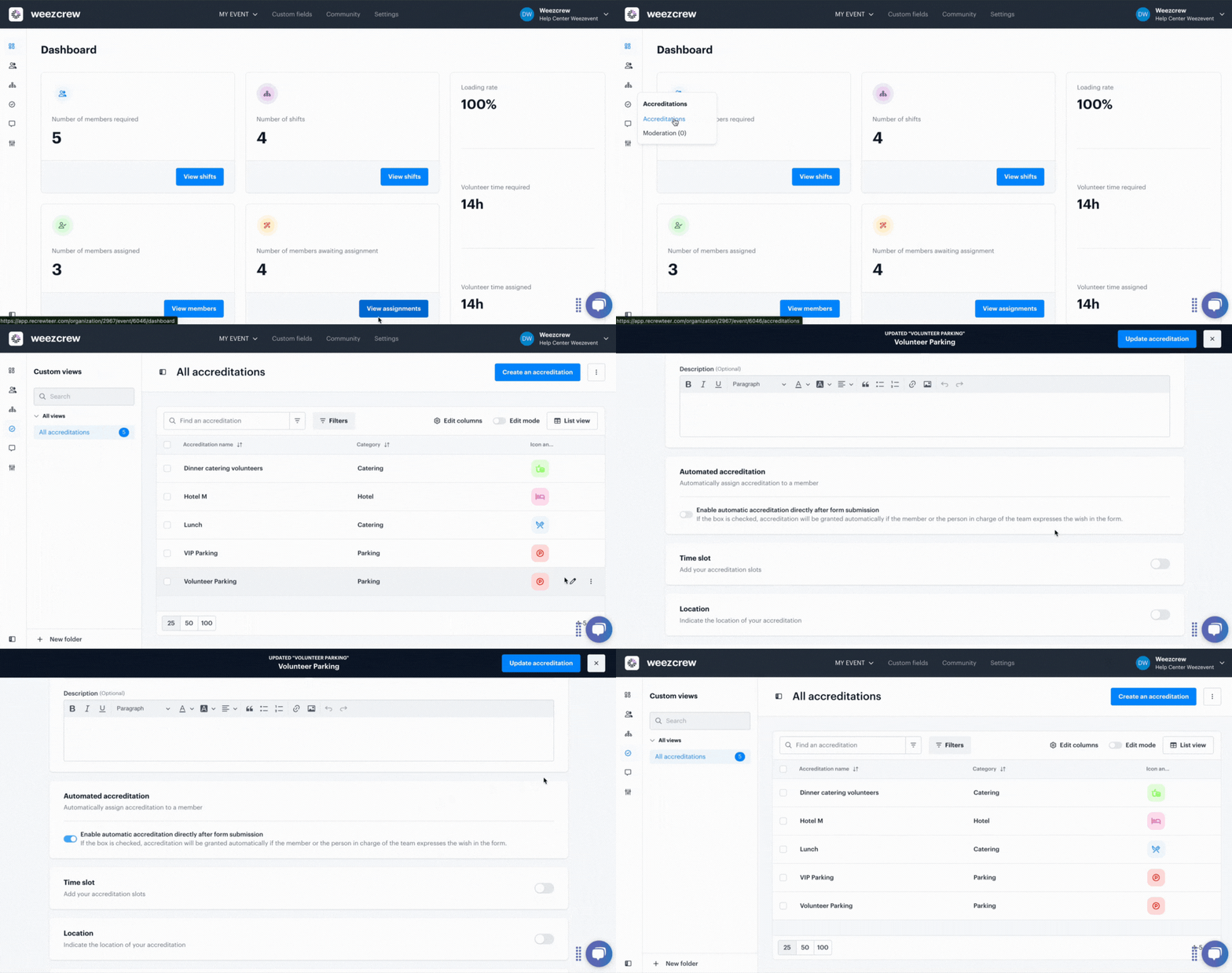
Go to the ***Accreditations*** module, then click ***Create an accreditation*** if one hasn’t been created yet, or click the edit icon (pencil) to modify an existing accreditation.
Select the automated accreditation option.
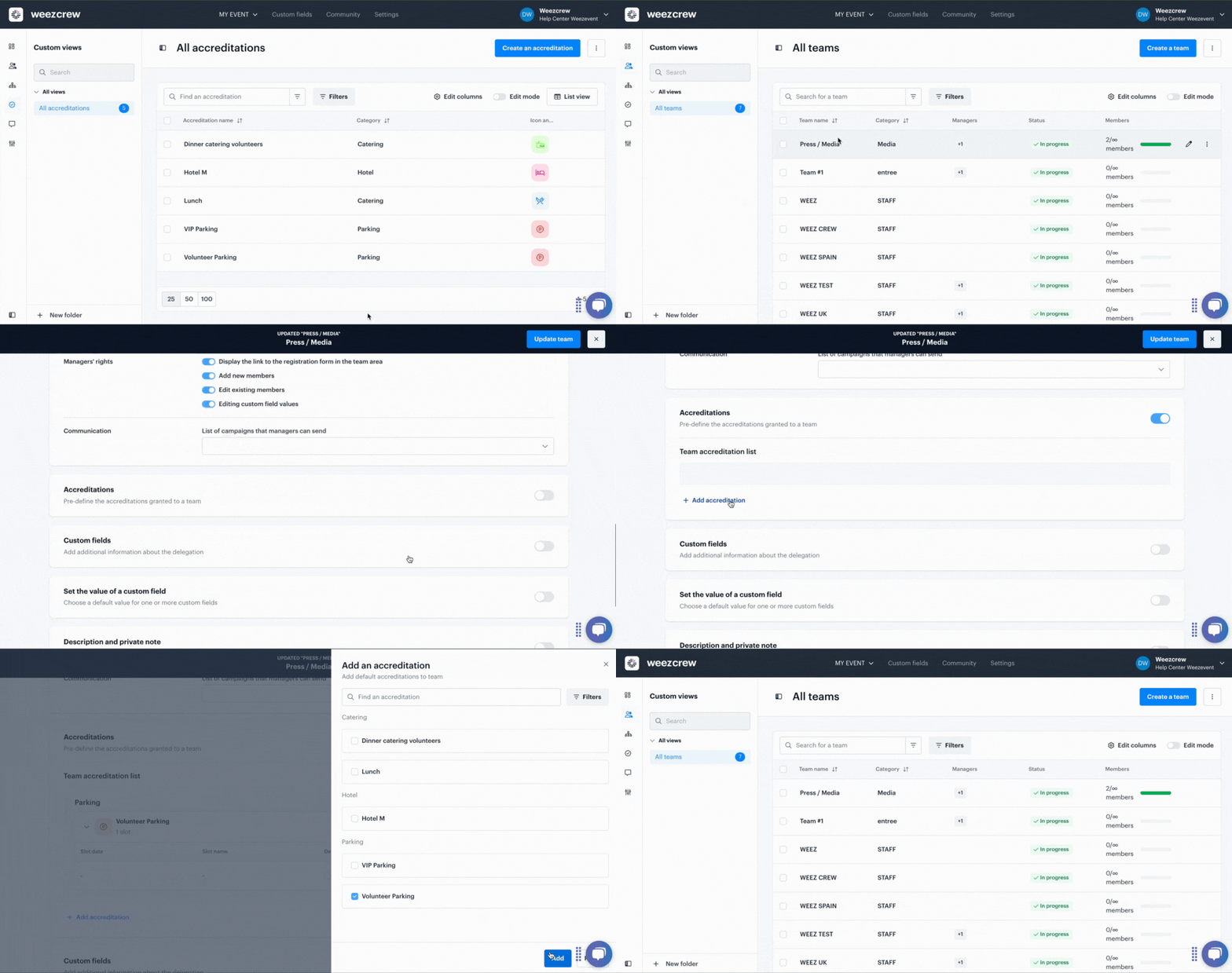
Then, go to the ***Teams*** module.
While editing a team, in the Accreditation section, enable the ***Pre-define the accreditations granted to a team*** option. Click ***Add accreditation*** and select the one of your choice.
**Note**: For the automation to function properly, it’s essential to request team members’ availability via the registration form. To do so, activate the following option in the Availability tab of the form: "Ask the member for their availability (by day only)."
- [Account management](https://support.weezevent.com/en/account-management?hsLang=en#main-content)
- [Administrator](https://support.weezevent.com/en/account-management?hsLang=en#administrator)
- [Managers](https://support.weezevent.com/en/account-management?hsLang=en#managers)
- [My first step with WeeCrew](https://support.weezevent.com/en/my-first-step-with-weecrew?hsLang=en#main-content)
- [Les étapes clés](https://support.weezevent.com/en/my-first-step-with-weecrew?hsLang=en#les-%C3%A9tapes-cl%C3%A9s)
- [Members](https://support.weezevent.com/en/members?hsLang=en#main-content)
- [Member profile](https://support.weezevent.com/en/members?hsLang=en#member-profile)
- [Filter & Export member information](https://support.weezevent.com/en/members?hsLang=en#filter-export-member-information)
- [Member space](https://support.weezevent.com/en/members?hsLang=en#member-space)
- [Communauty](https://support.weezevent.com/en/members?hsLang=en#communauty)
- [Member attendance](https://support.weezevent.com/en/members?hsLang=en#member-attendance)
- [Teams](https://support.weezevent.com/en/teams?hsLang=en)
- [Custom fields](https://support.weezevent.com/en/custom-fields?hsLang=en)
- [Shifts](https://support.weezevent.com/en/shifts?hsLang=en#main-content)
- [Assignment Settings](https://support.weezevent.com/en/shifts?hsLang=en#assignment-settings)
- [Assignment Management](https://support.weezevent.com/en/shifts?hsLang=en#assignment-management)
- [Assignments](https://support.weezevent.com/en/assignments?hsLang=en)
- [Accreditations](https://support.weezevent.com/en/accreditations?hsLang=en)
- [Forms](https://support.weezevent.com/en/forms?hsLang=en)
- [Campaigns](https://support.weezevent.com/en/campaigns?hsLang=en)
- [Documents](https://support.weezevent.com/en/documents?hsLang=en)
- [Options](https://support.weezevent.com/en/options?hsLang=en)
- [Technical tips](https://support.weezevent.com/en/technical-tips?hsLang=en)

© Weezevent
Copyright © 2026, Weezevent