---
title: Assign an Accreditation to One or More Members
description: Easily assign event accreditations to single or multiple members, defining access zones, meals, and permissions with personalised badges.
---
[Skip to content](https://support.weezevent.com/en/assign-an-accreditation-to-one-or-more-members#main-content)
- [English](https://support.weezevent.com/en/assign-an-accreditation-to-one-or-more-members)
- [Français](https://support.weezevent.com/fr/accrediter-un-ou-plusieurs-membres-sur-mon-evenement)
English
Show submenu for translations
![weez-logo-D-nb02-1.svg\]](https://support.weezevent.com/hubfs/weez-logo-D-nb02-1.svg)
Open main navigation
Close main navigation
- - [English](https://support.weezevent.com/en/assign-an-accreditation-to-one-or-more-members)
- [Français](https://support.weezevent.com/fr/accrediter-un-ou-plusieurs-membres-sur-mon-evenement)
English
Show submenu for translations
- [Log in to WeezCrew](https://admin.weezevent.com/crew/auth/sign-in/email)
[Log in to WeezCrew](https://admin.weezevent.com/crew/auth/sign-in/email)
Welcome to the WeezCrew helpcenter
- There are no suggestions because the search field is empty.
1. [WeezCrew - Help Centre](https://support.weezevent.com/en?hsLang=en)
2. [Accreditations](https://support.weezevent.com/en/accreditations?hsLang=en)
# Assign an Accreditation to One or More Members
> Accreditations are used to identify members on-site and define their access rights with personalised badges. The ***Accreditations*** module allows you to create and assign accreditations tailored to your event’s needs (access zones, meals, cashless options, etc.).
**Requirement:** The accreditation must already be created for the event. To do so, follow [this article](https://support.weezevent.com/en/create-accreditations?hsLang=en).
### **Assign an Accreditation to a Single Member**
Go to the member list and select the member’s profile \> ***Actions** \> **Assign accreditation***
Choose the accreditation you want to assign to the member, then click on ***Assign.***
### **Assign the Same Accreditation to Multiple Members**
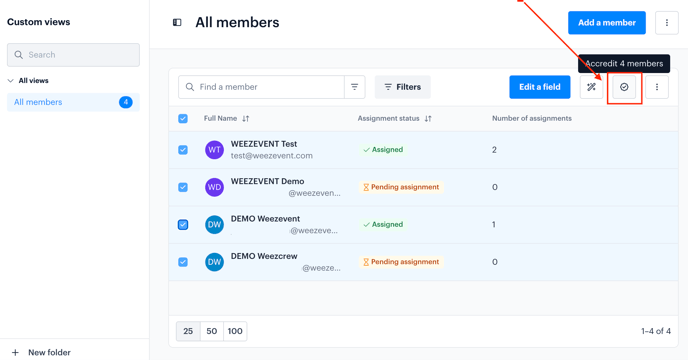
Select the members from the list, then click the ***Assign accreditation*** button at the top right.
Choose the accreditation to apply and confirm the assignment.
### **View Assigned Accreditations**
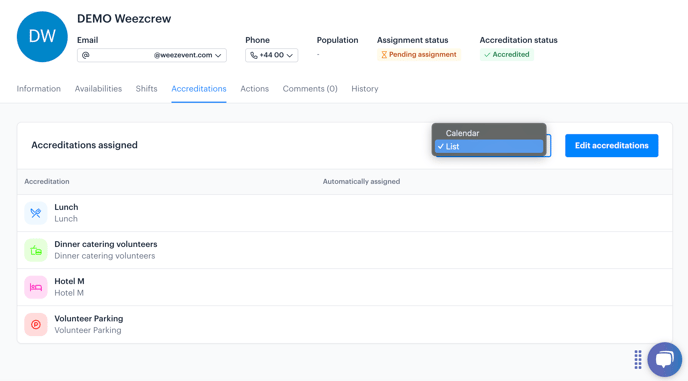
To view the accreditations assigned to a member, open their profile and go to the ***Accreditations*** tab. All assigned access and permissions will be displayed there.
- [Account management](https://support.weezevent.com/en/account-management?hsLang=en#main-content)
- [Administrator](https://support.weezevent.com/en/account-management?hsLang=en#administrator)
- [Managers](https://support.weezevent.com/en/account-management?hsLang=en#managers)
- [My first step with WeeCrew](https://support.weezevent.com/en/my-first-step-with-weecrew?hsLang=en#main-content)
- [Les étapes clés](https://support.weezevent.com/en/my-first-step-with-weecrew?hsLang=en#les-%C3%A9tapes-cl%C3%A9s)
- [Members](https://support.weezevent.com/en/members?hsLang=en#main-content)
- [Member profile](https://support.weezevent.com/en/members?hsLang=en#member-profile)
- [Filter & Export member information](https://support.weezevent.com/en/members?hsLang=en#filter-export-member-information)
- [Member space](https://support.weezevent.com/en/members?hsLang=en#member-space)
- [Communauty](https://support.weezevent.com/en/members?hsLang=en#communauty)
- [Member attendance](https://support.weezevent.com/en/members?hsLang=en#member-attendance)
- [Teams](https://support.weezevent.com/en/teams?hsLang=en)
- [Custom fields](https://support.weezevent.com/en/custom-fields?hsLang=en)
- [Shifts](https://support.weezevent.com/en/shifts?hsLang=en#main-content)
- [Assignment Settings](https://support.weezevent.com/en/shifts?hsLang=en#assignment-settings)
- [Assignment Management](https://support.weezevent.com/en/shifts?hsLang=en#assignment-management)
- [Assignments](https://support.weezevent.com/en/assignments?hsLang=en)
- [Accreditations](https://support.weezevent.com/en/accreditations?hsLang=en)
- [Forms](https://support.weezevent.com/en/forms?hsLang=en)
- [Campaigns](https://support.weezevent.com/en/campaigns?hsLang=en)
- [Documents](https://support.weezevent.com/en/documents?hsLang=en)
- [Options](https://support.weezevent.com/en/options?hsLang=en)
- [Technical tips](https://support.weezevent.com/en/technical-tips?hsLang=en)

© Weezevent
Copyright © 2026, Weezevent