---
title: Discovering the WeezCrew Interface
description: Explore the WeezCrew interface and learn how to manage events, volunteers, shifts, and communication tools with an intuitive dashboard.
---
[Skip to content](https://support.weezevent.com/en/discovering-the-weezcrew-interface#main-content)
- [English](https://support.weezevent.com/en/discovering-the-weezcrew-interface)
- [Français](https://support.weezevent.com/fr/decouverte-de-linterface-de-weezcrew)
English
Show submenu for translations
![weez-logo-D-nb02-1.svg\]](https://support.weezevent.com/hubfs/weez-logo-D-nb02-1.svg)
Open main navigation
Close main navigation
- - [English](https://support.weezevent.com/en/discovering-the-weezcrew-interface)
- [Français](https://support.weezevent.com/fr/decouverte-de-linterface-de-weezcrew)
English
Show submenu for translations
- [Log in to WeezCrew](https://admin.weezevent.com/crew/auth/sign-in/email)
[Log in to WeezCrew](https://admin.weezevent.com/crew/auth/sign-in/email)
Welcome to the WeezCrew helpcenter
- There are no suggestions because the search field is empty.
1. [WeezCrew - Help Centre](https://support.weezevent.com/en?hsLang=en)
2. [My first step with WeeCrew](https://support.weezevent.com/en/my-first-step-with-weecrew?hsLang=en)
# Discovering the WeezCrew Interface
### A simple and intuitive solution.
Your event dashboard appears with two main navigation areas:
- A horizontal bar dedicated to the various settings available for your event.
- A vertical bar that brings together all the solution’s modules and features, represented by icons.
### **1. The Horizontal Bar:**
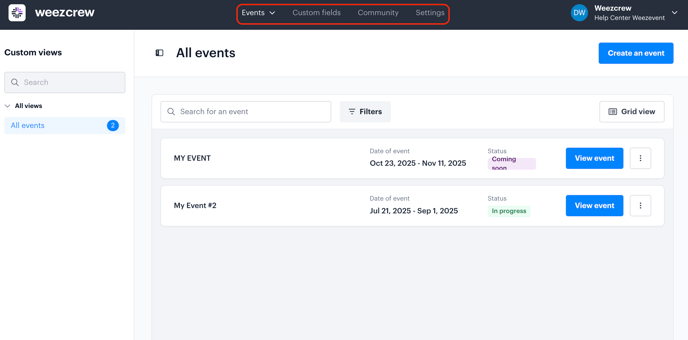
- **Events:** Displays all the events linked to your organization.
- **Custom Fields:** Allows you to create personalized information fields required for the registration form (e.g., first name, last name, phone number, etc.).
- **Community:** An optional feature that lets you gather all volunteers involved across your various events in one place.
- **Settings:** Contains personal information for the account administrator, the organization, and all associated users
### **2. The Sidebar:**
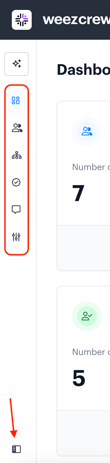 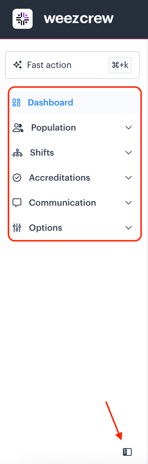
**Tip:** You can customise your menu display by clicking the icon below.
- **Dashboard:** A summary of your event data (number of members, number of missions, assignments, etc.).
- **Populations (Members and Teams):** This section gathers all volunteers registered for the event, whether they signed up individually or through a delegation
- **Shift and Assignments:** Here, you can create all the tasks required for your event to run smoothly, then assign volunteers based on predefined roles and time slots
- **Accreditations** *(optional module)***:** Allows you to manage participant accreditations and sync information with external systems like cashless payments or access control
- **Communication:** This tab centralizes all the tools you need to communicate effectively with your volunteers, while customizing the experience to reflect your event’s identity. It includes several sub-modules:
- **Emails:** Customize automated emails with your event’s branding and visual identity
- **Form:** Create a tailored registration form to recruit volunteers, with fully customizable fields
- **Campaigns:** Send targeted communications via email or SMS to quickly inform your volunteers
- **Documents:** Generate materials for volunteers and managers (schedules, job descriptions, listings, badges, etc.)
- **API & Integrations:** Access the list of available APIs and integrations within WeezCrew. These tools help connect your platform to other systems for real-time data sharing and process automation
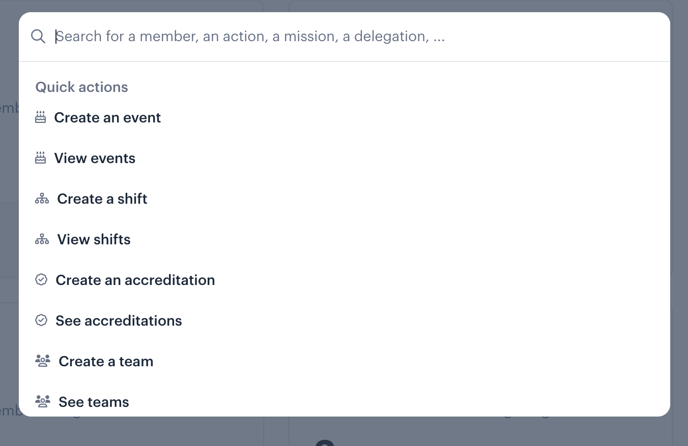
**Fast Action**: Gives you one-click access to features such as creating an event, mission, delegation, or campaign. You can also access them even faster using the Command + K keyboard shortcut.
**Note:** Our support team is always available through the integrated chat. Marie and Victor, our project managers, are also here to guide you every step of the way.
You can check their availability and book a support session or meeting whenever needed. You can find our contact details [here](https://support.weezevent.com/en/contact-weezcrews-team?hsLang=en).
- [Account management](https://support.weezevent.com/en/account-management?hsLang=en#main-content)
- [Administrator](https://support.weezevent.com/en/account-management?hsLang=en#administrator)
- [Managers](https://support.weezevent.com/en/account-management?hsLang=en#managers)
- [My first step with WeeCrew](https://support.weezevent.com/en/my-first-step-with-weecrew?hsLang=en#main-content)
- [Les étapes clés](https://support.weezevent.com/en/my-first-step-with-weecrew?hsLang=en#les-%C3%A9tapes-cl%C3%A9s)
- [Members](https://support.weezevent.com/en/members?hsLang=en#main-content)
- [Member profile](https://support.weezevent.com/en/members?hsLang=en#member-profile)
- [Filter & Export member information](https://support.weezevent.com/en/members?hsLang=en#filter-export-member-information)
- [Member space](https://support.weezevent.com/en/members?hsLang=en#member-space)
- [Communauty](https://support.weezevent.com/en/members?hsLang=en#communauty)
- [Member attendance](https://support.weezevent.com/en/members?hsLang=en#member-attendance)
- [Teams](https://support.weezevent.com/en/teams?hsLang=en)
- [Custom fields](https://support.weezevent.com/en/custom-fields?hsLang=en)
- [Shifts](https://support.weezevent.com/en/shifts?hsLang=en#main-content)
- [Assignment Settings](https://support.weezevent.com/en/shifts?hsLang=en#assignment-settings)
- [Assignment Management](https://support.weezevent.com/en/shifts?hsLang=en#assignment-management)
- [Assignments](https://support.weezevent.com/en/assignments?hsLang=en)
- [Accreditations](https://support.weezevent.com/en/accreditations?hsLang=en)
- [Forms](https://support.weezevent.com/en/forms?hsLang=en)
- [Campaigns](https://support.weezevent.com/en/campaigns?hsLang=en)
- [Documents](https://support.weezevent.com/en/documents?hsLang=en)
- [Options](https://support.weezevent.com/en/options?hsLang=en)
- [Technical tips](https://support.weezevent.com/en/technical-tips?hsLang=en)

© Weezevent
Copyright © 2026, Weezevent