---
title: Administrator Rights at WeezCrew
description: Understand admin roles in WeezCrew, how to grant rights, and manage full platform access for events and organizations effectively.
---
[Skip to content](https://support.weezevent.com/en/administrator-rights-at-weezcrew#main-content)
- [English](https://support.weezevent.com/en/administrator-rights-at-weezcrew)
- [Français](https://support.weezevent.com/fr/les-droits-dun-administrateur)
English
Show submenu for translations
![weez-logo-D-nb02-1.svg\]](https://support.weezevent.com/hubfs/weez-logo-D-nb02-1.svg)
Open main navigation
Close main navigation
- - [English](https://support.weezevent.com/en/administrator-rights-at-weezcrew)
- [Français](https://support.weezevent.com/fr/les-droits-dun-administrateur)
English
Show submenu for translations
- [Log in to WeezCrew](https://admin.weezevent.com/crew/auth/sign-in/email)
[Log in to WeezCrew](https://admin.weezevent.com/crew/auth/sign-in/email)
Welcome to the WeezCrew helpcenter
- There are no suggestions because the search field is empty.
1. [WeezCrew - Help Centre](https://support.weezevent.com/en?hsLang=en)
2. [Account management](https://support.weezevent.com/en/account-management?hsLang=en)
3. [Administrator](https://support.weezevent.com/en/account-management?hsLang=en#administrator)
# Administrator Rights at WeezCrew
An administrator has a complete overview of the platform and access to all its features.
### **Two Types of "Administrator" Profiles**:
- **Organisation Administrator:** Has visibility over all events — past and present — organised under the structure. This role also holds the authority to grant different access levels to other users on the platform.
- **Event Administrator:** Has full control and management rights over a **single event** organised by the structure. They can add collaborators, but only to their specific event.
### **What Are My Rights and Responsibilities on the Platform?**
As an administrator, you have access to **100% of the solution's features**. All modules are available directly from your dashboard.
Here’s a non-exhaustive list of the main tasks you can manage:
- Account settings configuration
- Mission creation
- Assignment management
- Creation and customisation of the registration form
- Creation of email and SMS campaigns
- Document management
**Important**: Granting "Administrator" access is a serious responsibility. Giving access to too many collaborators can lead to errors or misuse.
**We strongly recommend limiting the number of users with admin rights.**
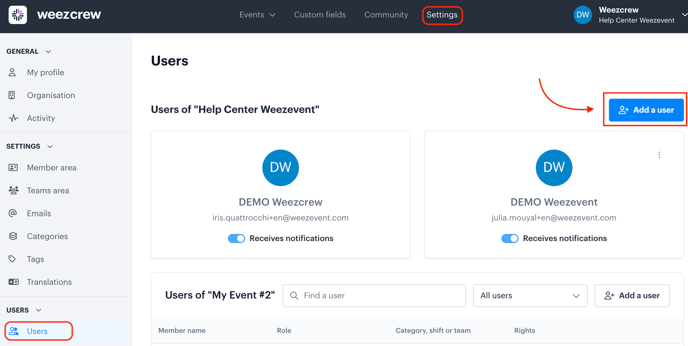
**How to Grant Administrator Rights to a New User?**
- Go to ***Settings***
- Navigate to the ***Users*** tab
- Click on the ***Add a User*** button
- [Account management](https://support.weezevent.com/en/account-management?hsLang=en#main-content)
- [Administrator](https://support.weezevent.com/en/account-management?hsLang=en#administrator)
- [Managers](https://support.weezevent.com/en/account-management?hsLang=en#managers)
- [My first step with WeeCrew](https://support.weezevent.com/en/my-first-step-with-weecrew?hsLang=en#main-content)
- [Les étapes clés](https://support.weezevent.com/en/my-first-step-with-weecrew?hsLang=en#les-%C3%A9tapes-cl%C3%A9s)
- [Members](https://support.weezevent.com/en/members?hsLang=en#main-content)
- [Member profile](https://support.weezevent.com/en/members?hsLang=en#member-profile)
- [Filter & Export member information](https://support.weezevent.com/en/members?hsLang=en#filter-export-member-information)
- [Member space](https://support.weezevent.com/en/members?hsLang=en#member-space)
- [Communauty](https://support.weezevent.com/en/members?hsLang=en#communauty)
- [Member attendance](https://support.weezevent.com/en/members?hsLang=en#member-attendance)
- [Teams](https://support.weezevent.com/en/teams?hsLang=en)
- [Custom fields](https://support.weezevent.com/en/custom-fields?hsLang=en)
- [Shifts](https://support.weezevent.com/en/shifts?hsLang=en#main-content)
- [Assignment Settings](https://support.weezevent.com/en/shifts?hsLang=en#assignment-settings)
- [Assignment Management](https://support.weezevent.com/en/shifts?hsLang=en#assignment-management)
- [Assignments](https://support.weezevent.com/en/assignments?hsLang=en)
- [Accreditations](https://support.weezevent.com/en/accreditations?hsLang=en)
- [Forms](https://support.weezevent.com/en/forms?hsLang=en)
- [Campaigns](https://support.weezevent.com/en/campaigns?hsLang=en)
- [Documents](https://support.weezevent.com/en/documents?hsLang=en)
- [Options](https://support.weezevent.com/en/options?hsLang=en)
- [Technical tips](https://support.weezevent.com/en/technical-tips?hsLang=en)

© Weezevent
Copyright © 2026, Weezevent